Title and products – overview
Understand titles and their formats (editions) including ISBNs, product types, and rights holder ownership.
In Royalties HQ, a title can have multiple formats. Examples of formats are: softcover, hardcover, ebook, audiobook. We refer to a specific format of a title as a “Product”. Sometimes this is referred to as an “edition”.
Titles
In Royalties HQ, a title is the ‘parent’ of its products (ISBNs).
Each title has only basic info, found in the Title Details tab:
- Title Name
- Royalty period (E.g. annual, quarterly)
- Royalty Period Start (This only applies to some title royalty periods, for instance, quarterly, you select, which month the quarterly period starts in)
- Title code. This is a unique identifier for the title (Note: this is not an ISBN, which apply to title formats). If you do not use unique IDs for titles – and most publishers don’t – Royalties HQ will automatically create one for each of your titles. The title code can’t be edited, and it’s not shown on royalty statements.

An example of a title in Royalties HQ. The ‘Title Details’ tab shows only the data that affects the whole title. Each product (ISBN) is listed in the menu on the left.
All other data relating to your titles are stored at the product level. Let’s look at that now.
Products
As described above, the product refers to a specific format (or edition) of a title. For instance, the e-book format of a specific title. Often, products have an ISBN, but not always.
Access the product using the menu on the left of the title details view (see screenshot above).
Tip: If you have many new products (ISBNs) to add or update, it’s much quicker to use CSV import.
Required fields
Each product requires at least one product ID:
- ISBN – The international ID for book products.
- ASIN – Amazon’s proprietary product identifier, e.g. used for Kindle e-books (Amazon ebooks do not require an ISBN).
- Other Product ID – Any other identifier used by your distributors or sales channels (e.g. ACX ID, Google Play ID, internal SKU).
Other required fields:
- Product Type – softcover, hardcover, e-book, audiobook, etc
- Status – The status of this product, defaults to ‘Active’. Inactive titles will not be included in statements where the format has not made any sales. However, inactive products (ISBNs) are included in statements where sales are made and royalties have accrued.
Optional fields
Optional data for a title (the first three are recommended):
- Date First Published – Products (ISBNs) that have a published date after the period of a royalty run will be left out of that royalty run. Make sure you add a published date to prevent a product being included in royalty runs for periods prior to its publish date.
- RRP List price – The ‘fallback’ retail (or “list”) price of the product. List price is used in royalty allocation when a contract rule has its royalty model set to List price or List price minus discount. Normally, list price is derived from each sales line and converted to publisher currency automatically during conversion. However, when a sales line has no list price set, the list price saved on the product is used as a fallback. So adding a fallback list price on the product is highly recommended.
- Legacy Units Sold – Use this field to record the number of units sold for this product prior to using Royalties HQ.
- Legacy Royalties Earned – Use this field to record the net royalties earned by this product prior to using Royalties HQ.
- Date withdrawn from publication
- Number of Pages – Applies to printed product types only
- Imprint – The imprint, or brand name under which this product was published. Optional.
Importing titles and products
Products can be imported and updated in bulk. Learn more here.
Rights holder ownership
At the bottom of each product details tab is the Rights Holders table – listing the rights holders for that product (each product has its own rights holders).
Tip: You can jump to the rights holders table by clicking the rights holders card at the top of the product.
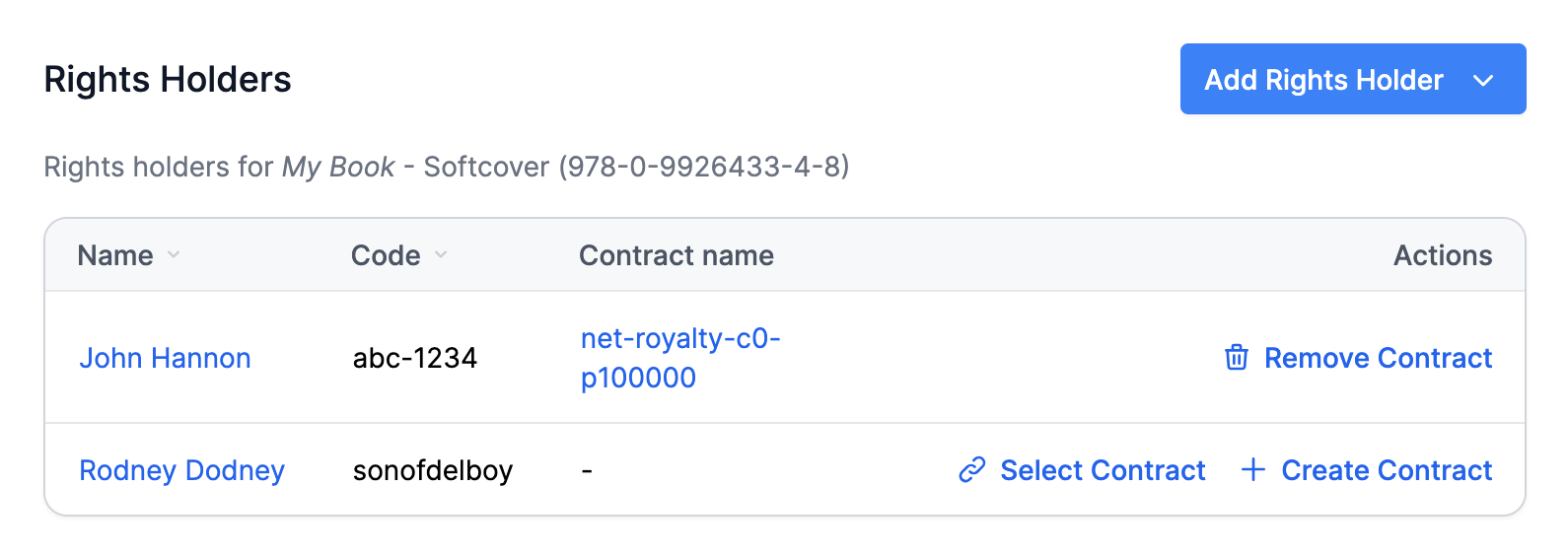
The rights holders table on an individual product.
You can link a rights holder to this product by using the 'Add Rights Holder button. Then, you must add a contract to determine the rights hodler’s ownership rules for this product. You can select an existing contract type (e.g. if you wish to use a standard contract), or you can create a brand new contract. Learn more about contracts in Royalties HQ.